 FOMO Developers
Mobile Payment Integration (POS)
FOMO Pay API - Mobile Payment Integration (POS) v1.3.3

Mobile Payment Integration (POS) Guide v1.3.3
1. Change Log
V1.3.0
| S/N | Comments |
| 1 | Add change log |
| 2 | Add new Message API for batch pre-submit |
| 3 | Add new field 114 in batch submit response |
| 4 | Add new Message API to retrieve supported SOF of a terminal |
| 5 | Add new Resource API for SOF query |
| 6 | Add Table 12 - Table 16 in Appendix |
| 7 | Add Response 1, Response 2 in Appendix |
| 8 | Update footer |
V1.3.1
| S/N | Comments |
| 1 | Reversal Request is deprecated |
| 2 | Add new field 113 in API responses |
V1.3.2
| S/N | Comments |
| 1 | Add new field 120 in the Request of Sale API |
| 2 | Add Table 17 - Extension Data for Sale Request |
V1.3.3
| S/N | Comments |
| 1 | Add Visa QR Static Condition code |
| 2 | Add card payment related fields |
2. Introduction
This document describes the interface specifications required for POS integration with FOMO Pay.
3. Sequence Diagram
4. POS Gateway Interface
4.1 URL
SIT/UAT https://pos.fomopay.io/rpc
Production https://pos.fomopay.net/rpc
4.2 Request Content Type
Content-Type: application/json; charset=utf-8 OR application/json4.3 Request Method
POST4.4 Response Content Type
Content-Type: application/json; charset=utf-8 OR application/json4.5 Request and Response Body (Sample)
{
  "0": "0200",
  "1": "a238408000c080000000010001000000",
  "3": "000000",
  "7": "1231235959",
  "11": "000135",
  "12": "235959",
  "13": "1231",
  "18": "0005",
  "25": "20",
  "41": "22222222",
  "42": "111111111111111",
  "49": "SGD",
  "88": "000000001000",
  "104": "Payment Description"
}
5. Security and Encryption
5.1 Transport Security
Transport Layer Security (TLS) 1.2.
5.2 Message Authentication
Following algorithm is used to authenticate both client (POS terminal) and server (POS gateway) in addition to TLS.
Prerequisite
The following keys are required:
- RSA key pair (key pair 1) generated by POS vendor (See Appendix – Generating an RSA Key Pair).
- RSA key pair (key pair 2) generated by FOMO Pay.
POS vendor shall share public key of key pair 1 with FOMO Pay. FOMO Pay will register the two key pairs in POS gateway system and share public key of key pair 2 with POS vendor. A key id representing the two key pairs will also be shared with POS vendor.
POS vendor shall have the following after key exchange.
- Private key of key pair 1
- Public key of key pair 2
- Key id representing the two key pairs.
Algorithm
Before sending a message to POS gateway, the message shall be signed. Any message not properly signed or not properly formatted will be rejected by POS gateway.
The signing algorithm is as follows:
- POS terminal serialize JSON to an UTF-8 encoded string buffer [payload].
- POS terminal generates UNIX timestamp [timestamp] and a nonce [nonce] on device. [timestamp] should be in 10 digits and [nonce] should have a length of 16 – 256.
- POS terminal concatenate the payload, timestamp and nonce and get byte array to be digested.
- POS terminal calculate the signature of the byte array using SHA256WithRSA with private key of key pair 1 and get the raw sign.
- POS terminal then convert the raw sign to lowercase hexadecimal [sign].
- POS terminal prepare HTTP request in following format.
| Headers | |
| X-Authentication-Version | 1.1 |
| X-Authentication-Method | SHA256WithRSA |
| X-Authentication-KeyId | [keyid] |
| X-Authentication-Nonce | [nonce] |
| X-Authentication-Timestamp | [timestamp] |
| X-Authentication-Sign | [sign] |
| Content-Type | application/json |
| Body | |
| [payload] |
Upon receiving message from POS gateway, the POS terminal shall verify the signature in the response HTTP header.
The verification algorithm is as follows:
- POS terminal extracts the following HTTP headers from HTTP response.
X-Authentication-Version: [version]
X-Authentication-Method: [method]
X-Authentication-Nonce: [nonce]
X-Authentication-Timestamp: [timestamp]
X-Authentication-Sign: [sign]
Content-Type: [content-type]- If one or more condition of the following does not satisfy, reject the response.
- version is 1.1
- method is SHA256WithRSA
- nonce exists and was not used by POS gateway within 300 seconds
- timestamp within ± 300 seconds of current time
- POS terminal reads response body [payload] from HTTP response.
- POS terminal concatenate the payload, timestamp and nonce and get byte array to be digested.
- POS terminal verifies the digest against received signature sign using SHA256WithRSA with public key of key 2.
- If the signature cannot be verified, reject the response.
6. Symbols and Abbreviated Terms
6.1 Field Types
| Abbreviation | Description | Comment |
| a | Alpha and space | a-zA-ZSPACE |
| n | Numeric values only | 0-9 |
| s | Special characters only | !"#$%&'()*+,-./:;<=>?@[]^_`{|}~ |
| .x | Variable length field up to x bytes | |
| ..xx | Variable length field up to xx bytes | |
| ...xxx | Variable length field up to xxx bytes |
6.2 Required Flag
| Abbreviation | Description |
| M | Mandatory |
| O | Optional |
| C | Conditional |
| X | Not supported |
7. Message Types and Specification
7.1 Sale Request
| Key | Field Name | Field Type | Required | Comments |
| 0 | Message type identifier | n4 | M | 0200 |
| 1 | Bitmap | an16/an32 | M | See Appendix – Bitmap Calculation |
| 2 | Card number | n..19 | C | For direct card-scheme card payment transactions, this value needs to be provided Please confirm the technical details with FOMO regarding the eligibility for card payments. |
| 3 | Processing code | n6 | M | 000000 |
| 7 | Transmission date & time (MMDDHHmmss) | n10 | M | |
| 11 | System trace audit number (STAN) | n6 | M | |
| 12 | Local transaction time (HHmmss) | n6 | M | |
| 13 | Local transaction date (MMDD) | n4 | M | |
| 18 | Merchant type, or merchant category code | n4 | M | ISO 18245 |
| 22 | Point of service entry mode | n3 | C | For direct card‑scheme card payment transactions, this value is required. Please confirm the technical details with FOMO regarding the eligibility for card payments. |
| 23 | Application PAN sequence number | n3 | C | For direct card‑scheme card payment transactions, this value is required. Please confirm the technical details with FOMO regarding the eligibility for card payments. |
| 25 | Point of service condition code | n2 | M | See Appendix - Table 1 |
| 35 | Track 2 data | ans..37 | C | For direct card-scheme card payment transactions, this value is required. Please confirm the technical details with FOMO regarding the eligibility for card payments. |
| 41 | Card acceptor terminal identification | ans8 | M | Terminal ID assigned by FOMO Pay |
| 42 | Card acceptor identification code | ans15 | M | Merchant ID assigned by FOMO Pay |
| 48 | Additional data (private) | an...999 | C | See Appendix - Table 1 |
| 49 | Currency code, transaction | a3 | M | ISO 4217 currency code |
| 52 | Personal identification number data | ans16 | C | For direct card-scheme card payment transactions, this value is required. Please confirm the technical details with FOMO regarding the eligibility for card payments. |
| 53 | Security related control information | n16 | C | For direct card-scheme card payment transactions, this value is required. Please confirm the technical details with FOMO regarding the eligibility for card payments. |
| 54 | Additional amounts | an...120 | O | See Appendix – Table 9 |
| 55 | ICC data – EMV having multiple tags | ans...999 | C | For direct card-scheme card payment transactions, this value is required. Please confirm the technical details with FOMO regarding the eligibility for card payments. |
| 62 | Order number | ans...999 | O | Order number assigned by merchant |
| 88 | Total amount of debits | n12 | M | The amount of payment is accurate to the smallest unit of currency |
| 104 | Transaction description | ans...100 | M | Description of the transaction to be shown on user e-wallet or e-receipt(length is required to be greater or equal than 1) |
| 120 | ExtensionData | ans...999 | O | See Appendix - Table 17 |
7.2 Sale Response
| Key | Field Name | Field Type | Required | Comments |
| 0 | Message type identifier | n4 | M | 0210 |
| 1 | Bitmap | an16/an32 | M | See Appendix – Bitmap Calculation |
| 3 | Processing code | n6 | M | Return Unchanged |
| 7 | Transmission date & time (MMDDHHmmss) | n10 | M | Return Unchanged |
| 11 | System trace audit number (STAN) | n6 | M | Return Unchanged |
| 12 | Local transaction time (HHmmss) | n6 | M | Return Unchanged |
| 13 | Local transaction date (MMDD) | n4 | M | Return Unchanged |
| 18 | Merchant type, or merchant category code | n4 | M | Return Unchanged |
| 25 | Point of service condition code | n2 | M | Return Unchanged |
| 37 | Retrieval reference number | an...24 | C | Unique reference number assigned by FOMO Pay Applicable when request success |
| 39 | Response code | n2 | M | See Appendix – Table 2 |
| 41 | Card acceptor terminal identification | ans8 | M | Return Unchanged |
| 42 | Card acceptor identification code | ans15 | M | Return Unchanged |
| 49 | Currency code, transaction | a3 | M | Return Unchanged |
| 54 | Additional amounts | an...120 | O | Return Unchanged |
| 55 | ICC data – EMV having multiple tags | ans...999 | C | For direct card-scheme card payment transactions, this value is included Applicable when request success Please confirm the technical details with FOMO regarding the eligibility for card payments. |
| 62 | Order number | ans...999 | O | Return Unchanged |
| 63 | Reserved (private) | ans...999 | C | See Appendix - Table 18 Applicable when request success |
| 88 | Total amount of debits | n12 | M | Return Unchanged |
| 104 | Transaction description | ans...100 | M | Return Unchanged |
| 113 | Message | ans...999 | C | Error Message in hexadecimal encoding when Response Code is not 00 |
7.3 Query Request
| Key | Field Name | Field Type | Required | Comments |
| 0 | Message type identifier | n4 | M | 0100 |
| 1 | Bitmap | an16/an32 | M | See Appendix – Bitmap Calculation |
| 3 | Processing code | n6 | M | 300000 |
| 7 | Transmission date & time (MMDDHHmmss) | n10 | M | |
| 11 | System trace audit number (STAN) | n6 | M | Same as STAN in Sale Request |
| 41 | Card acceptor terminal identification | ans8 | M | Terminal ID assigned by FOMO Pay |
| 42 | Card acceptor identification code | ans15 | M | Merchant ID assigned by FOMO Pay |
7.4 Query Response
| Key | Field Name | Field Type | Required | Comments |
| 0 | Message type identifier | n4 | M | 0110 |
| 1 | Bitmap | an16/an32 | M | See Appendix – Bitmap Calculation |
| 3 | Processing code | n6 | M | Return Unchanged |
| 7 | Transmission date & time (MMDDHHmmss) | n10 | M | Return Unchanged |
| 11 | System trace audit number (STAN) | n6 | M | Return Unchanged |
| 39 | Response code | n2 | M | See Appendix – Table 3 |
| 41 | Card acceptor terminal identification | ans8 | M | Return Unchanged |
| 42 | Card acceptor identification code | ans15 | M | Return Unchanged |
| 113 | Message | ans...999 | C | Error Message in hexadecimal encoding when Response Code is not indicating a status (00, 05, 06, 09, 21, 22, 23 are indicating transaction status) |
7.5 Reversal Request
Reversal can be initiated only when the original transaction is successful, and the transaction batch is not yet submitted.
Note: Reversal is currently supported for WeChat Pay, Alipay and Singtel Dash transactions. Others will be supported in the future.
Note: Reversal is deprecated and not updated from V1.3.0. Please use Void and Refund instead.
| Key | Field Name | Field Type | Required | Comments |
| 0 | Message type identifier | n4 | M | 0420 |
| 1 | Bitmap | an16/an32 | M | See Appendix – Bitmap Calculation |
| 3 | Processing code | n6 | M | 000000 |
| 7 | Transmission date & time (MMDDHHmmss) | n10 | M | |
| 11 | System trace audit number (STAN) | n6 | M | Same as STAN in Sale Request |
| 41 | Card acceptor terminal identification | ans8 | M | Terminal ID assigned by FOMO Pay |
| 42 | Card acceptor identification code | ans15 | M | Merchant ID assigned by FOMO Pay |
7.6 Reversal Response
| Key | Field Name | Field Type | Required | Comments |
| 0 | Message type identifier | n4 | M | 0430 |
| 1 | Bitmap | an16/an32 | M | See Appendix – Bitmap Calculation |
| 3 | Processing code | n6 | M | Return Unchanged |
| 7 | Transmission date & time (MMDDHHmmss) | n10 | M | Return Unchanged |
| 11 | System trace audit number (STAN) | n6 | M | Return Unchanged |
| 39 | Response code | n2 | M | See Appendix – Table 4 |
| 41 | Card acceptor terminal identification | ans8 | M | Return Unchanged |
| 42 | Card acceptor identification code | ans15 | M | Return Unchanged |
7.7 Void Request
Void can be initiated for any transaction, but the transaction batch must have not been submitted.
Note: Void can be called for any transaction when the payment status is not SUCCESS. Or Void can be called for WeChat Pay, Alipay Singtel Dash and GrabPay transaction when payment status is SUCCESS. Others will be supported in the future.
| Key | Field Name | Field Type | Required | Comments |
| 0 | Message type identifier | n4 | M | 0440 |
| 1 | Bitmap | an16/an32 | M | See Appendix – Bitmap Calculation |
| 3 | Processing code | n6 | M | 000000 |
| 7 | Transmission date & time (MMDDHHmmss) | n10 | M | |
| 11 | System trace audit number (STAN) | n6 | M | Same as STAN in Sale Request |
| 41 | Card acceptor terminal identification | ans8 | M | Terminal ID assigned by FOMO Pay |
| 42 | Card acceptor identification code | ans15 | M | Merchant ID assigned by FOMO Pay |
7.8 Void Response
| Key | Field Name | Field Type | Required | Comments |
| 0 | Message type identifier | n4 | M | 0450 |
| 1 | Bitmap | an16/an32 | M | See Appendix – Bitmap Calculation |
| 3 | Processing code | n6 | M | Return Unchanged |
| 7 | Transmission date & time (MMDDHHmmss) | n10 | M | Return Unchanged |
| 11 | System trace audit number (STAN) | n6 | M | Return Unchanged |
| 39 | Response code | n2 | M | See Appendix – Table 5 |
| 41 | Card acceptor terminal identification | ans8 | M | Return Unchanged |
| 42 | Card acceptor identification code | ans15 | M | Return Unchanged |
| 113 | Message | ans...999 | C | Error Message in hexadecimal encoding when Response Code is not 00 |
7.9 Cancel Request
Cancel can be initiated only when the original transaction is not finished, and transaction batch is not yet submitted. E.g. The QR code has been generated but payment is not yet made.
| Key | Field Name | Field Type | Required | Comments |
| 0 | Message type identifier | n4 | M | 0460 |
| 1 | Bitmap | an16/an32 | M | See Appendix – Bitmap Calculation |
| 3 | Processing code | n6 | M | 000000 |
| 7 | Transmission date & time (MMDDHHmmss) | n10 | M | |
| 11 | System trace audit number (STAN) | n6 | M | Same as STAN in Sale Request |
| 41 | Card acceptor terminal identification | ans8 | M | Terminal ID assigned by FOMO Pay |
| 42 | Card acceptor identification code | ans15 | M | Merchant ID assigned by FOMO Pay |
7.10 Cancel Response
| Key | Field Name | Field Type | Required | Comments |
| 0 | Message type identifier | n4 | M | 0470 |
| 1 | Bitmap | an16/an32 | M | See Appendix – Bitmap Calculation |
| 3 | Processing code | n6 | M | Return Unchanged |
| 7 | Transmission date & time (MMDDHHmmss) | n10 | M | Return Unchanged |
| 11 | System trace audit number (STAN) | n6 | M | Return Unchanged |
| 39 | Response code | n2 | M | See Appendix – Table 6 |
| 41 | Card acceptor terminal identification | ans8 | M | Return Unchanged |
| 42 | Card acceptor identification code | ans15 | M | Return Unchanged |
| 113 | Message | ans...999 | C | Error Message in hexadecimal encoding when Response Code is not 00 |
7.11 Refund Request
Refund can be initiated only when original transaction is successful regardless of the status of the transaction batch. E.g. Transaction can be refunded after settlement.
Note: Refund is currently only supported at merchant portal. Refund through direct API call will be supported in the future.
| Key | Field Name | Field Type | Required | Comments |
| 0 | Message type identifier | n4 | M | 0400 |
| 1 | Bitmap | an16/an32 | M | See Appendix – Bitmap Calculation |
| 3 | Processing code | n6 | M | 000000 |
| 7 | Transmission date & time (MMDDHHmmss) | n10 | M | |
| 11 | System trace audit number (STAN) | n6 | M | |
| 12 | Local transaction time (HHmmss) | n6 | M | |
| 13 | Local transaction date (MMDD) | n4 | M | |
| 37 | Retrieval reference number | an...24 | M | Same as retrieval reference number in Sale Response |
| 41 | Card acceptor terminal identification | ans8 | M | Terminal ID assigned by FOMO Pay |
| 42 | Card acceptor identification code | ans15 | M | Merchant ID assigned by FOMO Pay |
| 89 | Reversal amount | n12 | M | Must use the same currency as in sale request |
| 104 | Transaction description | ans...100 | M | Description of the transaction (refund) to be shown on user e-wallet or e-receipt |
7.12 Refund Response
| Key | Field Name | Field Type | Required | Comments |
| 0 | Message type identifier | n4 | M | 0410 |
| 1 | Bitmap | an16/an32 | M | See Appendix – Bitmap Calculation |
| 3 | Processing code | n6 | M | Return Unchanged |
| 7 | Transmission date & time (MMDDHHmmss) | n10 | M | Return Unchanged |
| 11 | System trace audit number (STAN) | n6 | M | Return Unchanged |
| 12 | Local transaction time (HHmmss) | n6 | M | Return Unchanged |
| 13 | Local transaction date (MMDD) | n4 | M | Return Unchanged |
| 37 | Retrieval reference number | an...24 | M | Return Unchanged |
| 39 | Response code | n2 | M | See Appendix – Table 7 |
| 41 | Card acceptor terminal identification | ans8 | M | Return Unchanged |
| 42 | Card acceptor identification code | ans15 | M | Return Unchanged |
| 89 | Reversal amount | n12 | M | Return Unchanged |
| 104 | Transaction description | ans...100 | M | Return Unchanged |
| 113 | Message | ans...999 | C | Error Message in hexadecimal encoding when Response Code is not 00 |
7.13 Batch Pre-submit Request
Batch submit is to group a set of transactions into a batch. Only batch submitted transactions will be settled to merchant.
Batch pre-submit is an optional step for merchant to check current batch summary before making batch submit request.
| Key | Field Name | Field Type | Required | Comments |
| 0 | Message type identifier | n4 | M | 0500 |
| 1 | Bitmap | an16/an32 | M | See Appendix – Bitmap Calculation |
| 3 | Processing code | n6 | M | 300000 |
| 7 | Transmission date & time (MMDDHHmmss) | n10 | M | |
| 41 | Card acceptor terminal identification | ans8 | M | Terminal ID assigned by FOMO Pay |
| 42 | Card acceptor identification code | ans15 | M | Merchant ID assigned by FOMO Pay |
7.14 Batch Pre-submit Response
| Key | Field Name | Field Type | Required | Comments |
| 0 | Message type identifier | n4 | M | 0510 |
| 1 | Bitmap | an16/an32 | M | See Appendix – Bitmap Calculation |
| 3 | Processing code | n6 | M | Return Unchanged |
| 7 | Transmission date & time (MMDDHHmmss) | n10 | M | Return Unchanged |
| 39 | Response code | n2 | M | See Appendix – Table 8 |
| 41 | Card acceptor terminal identification | ans8 | M | Return Unchanged |
| 42 | Card acceptor identification code | ans15 | M | Return Unchanged |
| 113 | Message | ans...999 | C | Error Message in hexadecimal encoding when Response Code is not 00 |
| 114 | Batch summary | ans...999 | M | Serialized JSON Object See Appendix – Response 1 |
7.15 Batch Submit Request
Batch submit is to group a set of transactions into a batch. Only batch submitted transactions will be settled to merchant.
| Key | Field Name | Field Type | Required | Comments |
| 0 | Message type identifier | n4 | M | 0500 |
| 1 | Bitmap | an16/an32 | M | See Appendix – Bitmap Calculation |
| 3 | Processing code | n6 | M | 000000 |
| 7 | Transmission date & time (MMDDHHmmss) | n10 | M | |
| 41 | Card acceptor terminal identification | ans8 | M | Terminal ID assigned by FOMO Pay |
| 42 | Card acceptor identification code | ans15 | M | Merchant ID assigned by FOMO Pay |
7.16 Batch Submit Response
| Key | Field Name | Field Type | Required | Comments |
| 0 | Message type identifier | n4 | M | 0510 |
| 1 | Bitmap | an16/an32 | M | See Appendix – Bitmap Calculation |
| 3 | Processing code | n6 | M | Return Unchanged |
| 7 | Transmission date & time (MMDDHHmmss) | n10 | M | Return Unchanged |
| 39 | Response code | n2 | M | See Appendix – Table 8 |
| 41 | Card acceptor terminal identification | ans8 | M | Return Unchanged |
| 42 | Card acceptor identification code | ans15 | M | Return Unchanged |
| 113 | Message | ans...999 | C | Error Message in hexadecimal encoding when Response Code is not 00 |
| 114 | Batch summary | ans...999 | M | Serialized JSON Object See Appendix – Response 1 |
7.17 Retrieve Supported Sources of Fund Request
Retrieve supported sources of fund is an optional step for merchant to get the list of supported sources of fund (presented as condition codes in Appendix - Table 1) for a terminal.
| Key | Field Name | Field Type | Required | Comments |
| 0 | Message type identifier | n4 | M | 0800 |
| 1 | Bitmap | an16/an32 | M | See Appendix – Bitmap Calculation |
| 3 | Processing code | n6 | M | 600000 |
| 7 | Transmission date & time (MMDDHHmmss) | n10 | M | |
| 41 | Card acceptor terminal identification | ans8 | M | Terminal ID assigned by FOMO Pay |
| 42 | Card acceptor identification code | ans15 | M | Merchant ID assigned by FOMO Pay |
7.18 Retrieve Source of Fund Response
| Key | Field Name | Field Type | Required | Comments |
| 0 | Message type identifier | n4 | M | 0810 |
| 1 | Bitmap | an16/an32 | M | See Appendix – Bitmap Calculation |
| 3 | Processing code | n6 | M | Return Unchanged |
| 7 | Transmission date & time (MMDDHHmmss) | n10 | M | Return Unchanged |
| 39 | Response code | n2 | M | See Appendix – Table 12 |
| 41 | Card acceptor terminal identification | ans8 | M | Return Unchanged |
| 42 | Card acceptor identification code | ans15 | M | Return Unchanged |
| 113 | Message | ans...999 | C | Error Message in hexadecimal encoding when Response Code is not 00 |
| 116 | Supported sources of fund | ans...999 | M | Serialized JSON String Array of condition codes See Appendix – Response 2 |
7.19 Static QR Notification Request
Note: See Appendix – Static QR Notification
| Key | Field Name | Field Type | Required | Comments |
| 0 | Message type identifier | n4 | M | 0120 |
| 1 | Bitmap | an16/an32 | M | See Appendix – Bitmap Calculation |
| 3 | Processing code | n6 | M | 300000 |
| 7 | Transmission date & time (MMDDHHmmss) | n10 | M | |
| 11 | System trace audit number (STAN) | n6 | C | See Appendix – Table 10 |
| 41 | Card acceptor terminal identification | ans8 | M | Terminal ID assigned by FOMO Pay |
| 42 | Card acceptor identification code | ans15 | M | Merchant ID assigned by FOMO Pay |
7.20 Static QR Notification Response
| Key | Field Name | Field Type | Required | Comments |
| 0 | Message type identifier | n4 | M | 0130 |
| 1 | Bitmap | an16/an32 | M | See Appendix – Bitmap Calculation |
| 3 | Processing code | n6 | M | Return Unchanged |
| 7 | Transmission date & time (MMDDHHmmss) | n10 | M | Return Unchanged |
| 11 | System trace audit number (STAN) | n6 | C | See Appendix – Table 10 |
| 39 | Response code | n2 | M | See Appendix – Table 11 |
| 41 | Card acceptor terminal identification | ans8 | M | Return Unchanged |
| 42 | Card acceptor identification code | ans15 | M | Return Unchanged |
| 113 | Message | ans...999 | C | Error Message in hexadecimal encoding when Response Code is not 00 |
7.21 Static Query Request
| Key | Field Name | Field Type | Required | Comments |
| 0 | Message type identifier | n4 | M | 0140 |
| 1 | Bitmap | an16/an32 | M | See Appendix – Bitmap Calculation |
| 3 | Processing code | n6 | M | 300000 |
| 7 | Transmission date & time (MMDDHHmmss) | n10 | M | |
| 11 | System trace audit number (STAN) | n6 | M | Same as STAN in Static QR Notification Request |
| 41 | Card acceptor terminal identification | ans8 | M | Terminal ID assigned by FOMO Pay |
| 42 | Card acceptor identification code | ans15 | M | Merchant ID assigned by FOMO Pay |
7.22 Static Query Response
| Key | Field Name | Field Type | Required | Comments |
| 0 | Message type identifier | n4 | M | 0150 |
| 1 | Bitmap | an16/an32 | M | See Appendix – Bitmap Calculation |
| 3 | Processing code | n6 | M | Return Unchanged |
| 7 | Transmission date & time (MMDDHHmmss) | n10 | M | Return Unchanged |
| 11 | System trace audit number (STAN) | n6 | M | Return Unchanged |
| 25 | Point of service condition code | n2 | C | See Appendix - Table 1 Applicable when request success |
| 37 | Retrieval reference number | an...24 | C | Unique reference number assigned by FOMO Pay Applicable when request success |
| 39 | Response code | n2 | M | See Appendix – Table 3 |
| 41 | Card acceptor terminal identification | ans8 | M | Return Unchanged |
| 42 | Card acceptor identification code | ans15 | M | Return Unchanged |
| 49 | Currency code, transaction | a3 | C | ISO 4217 currency code Applicable when request success |
| 55 | ICC data – EMV having multiple tags | ans...999 | C | For direct card-scheme card payment transactions and the response code is 00, then this value is included |
| 63 | Reserved (private) | ans...999 | C | See Appendix - Table 18 |
| 88 | Total amount of debits | n12 | C | The amount of payment is accurate to the smallest unit of currency Applicable when request success |
| 113 | Message | ans...999 | C | Error Message in hexadecimal encoding when Response Code is not indicating a status (00, 05, 06, 09, 21, 22, 23 are indicating transaction status) |
8. Resource API
8.1 Query Source of Fund (SOF)
(Replace :conditionCode with conditionCode in Appendix - Table 1. e.g. 20 for WeChat Pay QR Code)
| URL | https://pos.fomopay.net/resource/sof/:conditionCode |
| Method | HTTP GET |
| Authentication | No authentication |
| Description | This API allows merchant to obtain details of source of fund. |
| Response Content-Type | application/json |
Response
| HTTP Status Code | Comments |
| 200 | SOF Retrieved |
| 404 | SOF Not Found |
| 500 | Server Error |
When HTTP status code is 2xx
| Key | Field Name | Field Type | Required | Comments |
| name | SOF Name | string | M | Name of SOF |
| country | SOF Country | string | M | Country of SOF ISO3166 alpha-2 |
| presentation | SOF Presentation | string | M | See Appendix - Table 13 |
| mode | SOF Mode | string | M | See Appendix - Table 14 |
| type | SOF Type | string | M | See Appendix - Table 15 |
| images | SOF Images | object | M | See Appendix - Table 16 |
Path Parameters
Condition code defined in the appendix table of the guide.
Response Body
application/json
Example:
9. Appendix
9.1 Table 1 – Condition Code for Sale Request
| Condition Code (25) | Field Name | Additional Data (48) |
| 18 | Card | For direct card-scheme card payment transactions, it contains the following information and needs to be serialized { encryptedKeySerialNumber: "",serviceCode: "",initiationChannel: "" } |
| 20 | WeChat Pay QR Code | X, not supported. Do not include this field with your request. |
| 21 | WeChat Pay Quick Pay | M, mandatory. Scanned WeChat barcode (authorization code). WeChat barcodes consist of 18 digits starting with 10, 11, 12, 13, 14 or 15. |
| 28 | Singtel Dash QR Code | X, not supported. Do not include this field with your request. |
| 30 | Alipay Merchant QR Code | X, not supported. Do not include this field with your request. |
| 31 | Alipay Barcode | M, mandatory. Scanned Alipay barcode. Alipay barcodes consist of 16 - 24 digits starting with 25, 26, 27, 28, 29 or 30. |
| 36 | NETS QR | X, not supported. Do not include this field with your request. |
| 50 | GrabPay | X, not supported. Do not include this field with your request. |
| 52 | Razer Pay | X, not supported. Do not include this field with your request. |
| 54 | UnionPay | X, not supported. Do not include this field with your request. |
| 82 | PayNow | X, not supported. Do not include this field with your request. |
| 46 | ShopeePay | X, not supported. Do not include this field with your request. |
| 90 | WeChat Pay Static QR | N.A. |
| 92 | Singtel Dash Static QR | N.A. |
| 95 | Alipay Static QR | N.A. |
| 94 | NETS Static QR | N.A. |
| 60 | GrabPay Static QR | N.A. |
| 61 | Razer Pay Static QR | N.A. |
| 62 | UnionPay Static QR | N.A. |
| 98 | PayNow Statis QR | N.A. |
| 63 | ShopeePay Statis QR | N.A. |
| 70 | Visa QR Static | N.A. |
9.2 Table 2 – Response Code for Sale Response
| Response Code | Field Name |
| 00 | Request completed successfully |
| 03 | Invalid merchant |
| 05 | Do not honor |
| 06 | Unsupported condition code |
| 09 | Request in progress |
| 26 | Duplicate record |
| 30 | Format error |
| 96 | System malfunction |
9.3 Table 3 – Response Code for Query/Static Query Response
| Response Code | Field Name |
| 00 | Payment success |
| 03 | Invalid merchant |
| 05 | Payment error |
| 06 | Payment closed |
| 09 | Payment in progress |
| 12 | Invalid transaction |
| 21 | Payment void |
| 22 | Payment reversed |
| 23 | Payment cancelled |
| 30 | Format error |
| 96 | System malfunction |
9.4 Table 4 – Response Code for Reversal Response
| Response Code | Field Name |
| 00 | Request completed successfully |
| 03 | Invalid merchant |
| 05 | Do not honor |
| 06 | Request not applicable |
| 12 | Invalid transaction |
| 30 | Format error |
| 96 | System malfunction |
9.5 Table 5 – Response Code for Void Response
| Response Code | Field Name |
| 00 | Request completed successfully |
| 03 | Invalid merchant |
| 05 | Do not honor |
| 06 | Request not applicable |
| 12 | Invalid transaction |
| 30 | Format error |
| 96 | System malfunction |
9.6 Table 6 – Response Code for Cancel Response
| Response Code | Field Name |
| 00 | Request completed successfully |
| 03 | Invalid merchant |
| 05 | Do not honor |
| 06 | Request not applicable |
| 12 | Invalid transaction |
| 30 | Format error |
| 96 | System malfunction |
9.7 Table 7 – Response Code for Refund Response
| Response Code | Field Name |
| 00 | Request completed successfully |
| 03 | Invalid merchant |
| 05 | Do not honor |
| 06 | Request not applicable |
| 12 | Invalid transaction |
| 30 | Format error |
| 96 | System malfunction |
9.8 Table 8 – Response Code for Batch Submit/Pre-submit Response
| Response Code | Field Name |
| 00 | Request completed successfully |
| 03 | Invalid merchant |
| 30 | Format error |
| 96 | System malfunction |
9.9 Table 9 – Additional Amounts (54) for Sale Request
| Flag | Name | Format | |
| B | Base amount (Same unit as Total amount of debits) | B000000000000 | |
| T | Tip amount (Same unit as Total amount of debits) | T000000000000 | |
Example:
For base amount 1000 cents and tip amount 200 cents, use B000000001000T000000000200
9.10 Table 10 – STAN for Static QR Notification Request/Response
| Phase | STAN (11) |
| Polling phase | X, not supported. Do not include this field with your request. |
| Fetching phase | M, mandatory. |
9.11 Table 11 – Response Code for Static QR Notification Response
| Response Code | Field Name |
| 00 | Long polling phase: pending transaction exists Fetching phase: STAN accepted |
| 03 | Invalid merchant |
| 12 | No pending transaction |
| 26 | Duplicate record |
| 30 | Format error |
| 96 | System malfunction |
9.12 Table 12 – Response Code for Retrieve Supported SOF Response
| Response Code | Field Name |
| 00 | Request completed successfully |
| 03 | Invalid merchant |
| 30 | Format error |
| 96 | System malfunction |
9.13 Table 13 – List of SOF Presentation
| Presentation | Description |
| QR | QR Code |
9.14 Table 14 – List of SOF Mode
| Mode | Description |
| MPM | Merchant presented mode |
| CPM | Consumer presented mode |
9.15 Table 15 – List of SOF Type
| Type | Description |
| STATIC | Static QR code when presentation is QR |
| DYNAMIC | Dynamic QR code when presentation is QR |
9.16 Table 16 – List of SOF Images
The images object contains the following:
| Key | Value |
| 128_128 | URL to 128px-by-128px (width by height) PNG image |
| 384_128 | URL to 384px-by-128px (width by height) PNG image |
9.17 Table 17 – Extension Data for Sale Request
Extension Data is a serialized JSON object which has the following content:
{
  "isEncryptedAuthCode": boolean // Applicable values: {true, false}
}
<isEncryptedAuthCode>: Indicator of the type of authentication code (For WeChat Palm Pay solution)
9.18 Table 18 - Reserved (private)
For QR payments, this field contains code information.
For card payments, please check with FOMO to confirm the technical requirements and eligibility for processing card transactions.
9.19 Response 1 – Batch Summary
Batch Summary is a serialized JSON object which has the following content:
{
  "batch": string,
  "sale": TStats,
  "refund": TStats
}<batch>: Current batch number.<sale>: Summary for sale transactions.<refund>: Summary for refund transactions.
TStats is defined as:
{
  "success": TAmountAndCount,
  "fail": TAmountAndCount,
  "void": TAmountAndCount,
  "cancelled": TAmountAndCount,
  "closed": TAmountAndCount
}<success>: Summary for sale or refund transactions which are completed successfully.<fail>: Summary for sale or refund transactions which are failed.<void>: Summary for sale transactions which are voided, not applicable to refund transactions.<cancelled>: Summary for sale transactions which are cancelled, not applicable to refund transactions.<closed>: Summary for sale transactions which are closed (sale transactions will be closed if payment not completed after timeout), not applicable to refund transactions.
TAmountAndCount is defined as:
{
  "amount": string,
  "count": number
}<amount>: total amount of sale or refund transactions in current status category.<count>: total number of sale or refund transactions in current status category.
9.20 Response 2 – Supported Sources of Fund
Supported sources of fund is a serialized JSON string array. Each element of the serialized array corresponds to a condition code listed in Appendix – Table 1.
When there is no source of fund supported for a terminal, the response is an empty array:
[]When there is source of fund supported for a terminal, the response includes a list of condition codes supported by the terminal:
["20", "30"]9.21 Static QR Notification
Push notification is achieved via long polling. There are two states involved in the polling.
Polling phase
Terminal sends 0120 message without field 11 (STAN) to initialize polling. Server may hold the
HTTP connection up to 30 seconds. Server will respond with 0130 message with field 39 (response code) set to 00, 12 or other values (see Table 11 – Response code for Static QR Query Response).
Response code 12 means there is no new transaction found and terminal shall immediately perform polling again.
Response code 00 means there is a new transaction found and state machine of terminal shall immediately turn into fetching phase.
If other response code found or connection timeout/disconnected unexpectedly, server shall perform polling again after 5 seconds.
Fetching phase
Terminal sends 0120 message with field 11 (STAN) to initialize fetching. Server will respond with 0130 message with field 39 (response code) set to 00, 12 or other values (see Table 11 – Response code for Static QR Query Response). Terminal can optionally send field 104 which is the description of the current transaction.
Response code 00 means the transaction is accepted by the server with the STAN provided by the terminal. Terminal shall immediately initiate 0140 message (static query) to query the final status of the transaction. Use the response code of static query response (see Table 3 – Response Code for Query/Static Query Response) for status and other information of the transaction. After determining the status of the transaction, state machine of terminal shall turn into polling phase.
Response code 12 means the previous transaction was aborted or cancelled. Server may hold the HTTP connection up to 30 seconds. State machine of terminal shall turn into polling phase.
If other response code found or connection timeout/disconnected unexpectedly, state machine of terminal shall turn into polling phase and perform polling after 5 seconds.
9.22 Calculating Bitmap
Bitmap is used to indicate whether data fields are present in the message.
Bitmap consists of a primary bitmap and a secondary bitmap. Secondary bitmap is optional when all keys are smaller than or equal to 64.
Field 0 and field 1 are ignored while calculating bitmap. If a secondary bitmap is used, first bit of primary bitmap must be set to 1.
Example 1:
Given fields 0, 1, 3, 7, 11, 41 and 42 present in a message. As no key larger than 64, only primary bitmap is required.

Final bitmap is 2220000000c00000.
Example 2:
Given fields 0, 1, 3, 7, 11, 12, 13, 18, 25, 41, 42, 49, 88 and 104 present in a message. As key 88 and 104 will not fit in primary bitmap, both primary and secondary bitmap must be used.
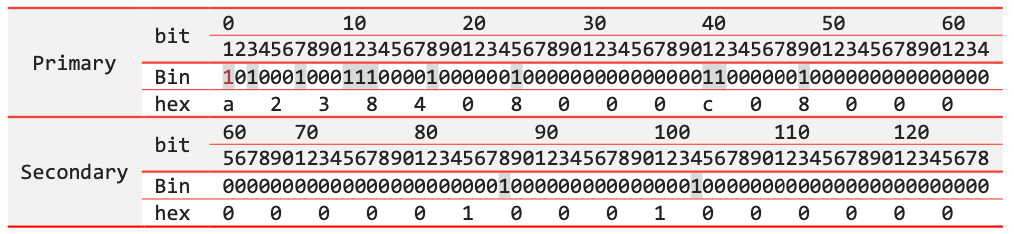
Final bitmap is a238408000c080000000010001000000.
9.23 Generating an RSA Key Pair
Use the follow commands (in bold) to generate an RSA key pair. You will need to have openssl installed prior to running the commands.
Please share the file containing only public key (posvendor.pub.pem) with FOMO Pay for configuration. The file containing secret key (posvendor.key.pem) shall always be kept secure.
| [user@host secure]~ openssl genrsa -out posvendor.key.pem 2048 Generating RSA private key, 2048 bit long modulus .................................+++ ..........................+++ e is 65537 (0x10001) [user@host secure]~ openssl rsa -in posvendor.key.pem -pubout -out posvendor.pub.pem writing RSA key [user@host secure]~ ls posvendor.key.pem posvendor.pub.pem |
Example
posvendor.pub.pem

posvendor.key.pem
